Maybe you created an AI girlfriend and, after spending some time chatting, realized that her personality is not quite what you expected. She may feel too playful, too serious, too talkative, or simply different from the kind of interaction you want.
So, can you change her personality?
Yes, some AI girlfriend apps let you change or adjust an existing character’s personality. However, the level of control depends on the platform. Some apps allow you to edit traits or rewrite a character description, while others keep pre-made characters largely fixed.
Here’s what you can realistically change, how those changes may affect future conversations, and when creating a new character may be the better choice.
Table of Contents
Can You Change an AI Girlfriend Personality?
Yes, but it depends on the app and the type of character you are using.
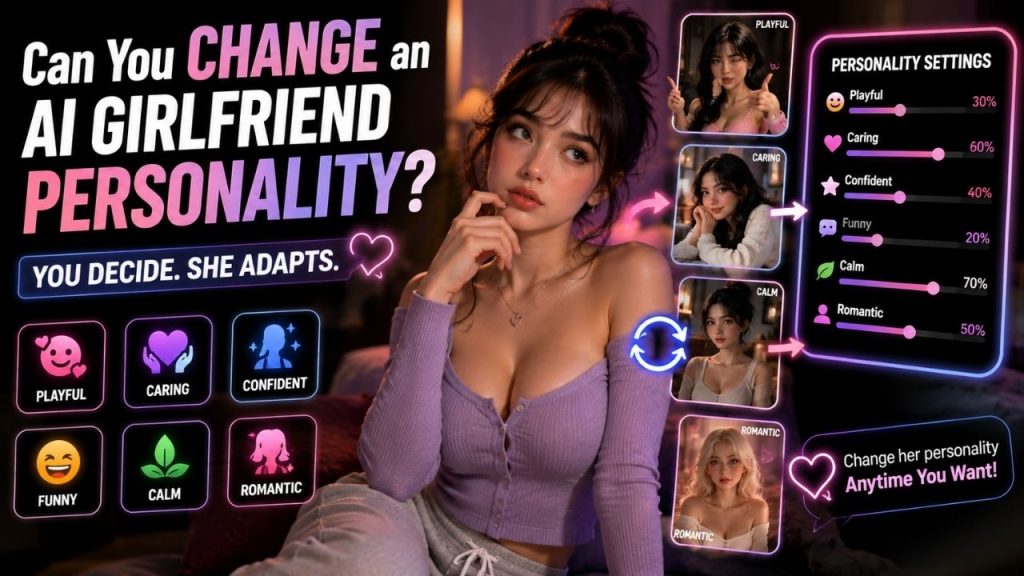
Some AI girlfriend platforms allow you to return to a character’s settings and adjust details that influence how she communicates. Depending on the platform, those settings may include:
- Personality traits
- Communication style
- Character description
- Interests or hobbies
- Background details
- General interaction preferences
For example, you may initially create a character who is playful, energetic, and sarcastic. Later, you might decide that you would prefer someone calmer, more caring, and thoughtful.
If the app supports personality editing, you may be able to make those changes without starting from scratch.
However, there is an important difference between adjusting a character and completely rebuilding one.
Some apps only let you change a few details. Others provide a custom description where you can rewrite much of the character’s personality. Pre-made characters can also have more restrictions because their personality may be part of the character’s original design.
So the short answer is simple: you can change an AI girlfriend’s personality on some platforms, but the editing options are not the same everywhere.
What Does Changing an AI Girlfriend’s Personality Mean?
Changing an AI girlfriend’s personality means modifying the information or settings used to guide how the character communicates and behaves.
You are not rewriting every answer the AI will ever give.
Instead, you are changing the general characteristics that can influence future conversations.
For example, imagine the character was originally described as:
Playful, confident, energetic, and enjoys teasing humor.
Later, you might change that description to:
Calm, caring, thoughtful, and prefers relaxed conversations.
That update can influence the character’s overall communication style.
Depending on the app, personality editing may involve several different areas:
| Area | What You May Be Able to Change |
| Personality traits | Playful, calm, caring, confident, shy, funny, and similar traits |
| Communication style | Casual, direct, humorous, thoughtful, or more reserved |
| Interests | Hobbies, favorite topics, or general interests |
| Character background | Details that help define the character |
| General behavior | The way the character is intended to interact |
The important thing to understand is that these settings act as guidance.
The AI still generates responses based on the current conversation, available context, and the way the platform’s character system works.
That means changing a personality from “funny” to “serious” does not guarantee that every future reply will suddenly become completely serious. Instead, the updated settings can change the general direction of how the character responds.
What Parts of an AI Girlfriend’s Personality Can You Change?
The answer varies from one app to another, but personality customization usually falls into a few common areas.
Personality Traits
Some platforms let you change individual traits directly.
For example, you may be able to adjust a character from:
- Playful to calm
- Shy to confident
- Serious to more humorous
- Reserved to more talkative
These changes can affect the general style of future conversations.
A character designed to be playful may use more humor or lighthearted language, while a calmer character may take a more relaxed approach.
The exact result can vary because AI responses are generated dynamically rather than selected from a fixed set of pre-written answers.
Communication Style
In some cases, the personality settings are more focused on how the character communicates.
You may prefer:
- Short and casual replies
- Longer conversations
- A humorous tone
- A thoughtful communication style
- More direct responses
- A quieter or more reserved approach
This type of change can be useful when you generally like the character but do not enjoy the way she communicates.
For example, you might want to keep a character friendly and caring while making her less sarcastic or less energetic.
Interests and Conversation Preferences
Some character systems allow you to edit interests, hobbies, or preferred topics.
This does not always change the core personality, but it can change the overall feel of the conversation.
A character interested in movies, gaming, books, or travel may naturally have different conversation opportunities from one designed around completely different interests.
Character Description
More flexible AI girlfriend apps may provide a custom description or character profile.
This can give you more control because you are not limited to selecting a few preset labels.
For example, you could change:
Friendly, playful, and enjoys making jokes.
To:
Friendly, calm, thoughtful, and enjoys meaningful conversations with occasional humor.
A custom description can give the system more context about the type of character you want.
However, adding an extremely long list of instructions does not always produce a better result. A clear and consistent description is usually easier for a character system to follow than a collection of traits that contradict each other.
How Do AI Girlfriend Personality Changes Work?
The exact process differs between apps, but the basic idea is usually straightforward.
You begin by finding the settings connected to the existing character.
Depending on the platform, this section may be called:
- Character settings
- Edit character
- Customize
- Personality
- Profile
- Character details
From there, you may see preset traits, editable fields, sliders, or a written description.
A typical process can look like this:
1. Open the Character Settings
Find the editing or customization options connected to the AI girlfriend you want to change.
Some apps place these settings directly on the character profile, while others put them inside a separate customization menu.
2. Find the Personality Information
Look for the part of the character profile that controls personality traits, behavior, communication style, or character instructions.
You may see individual options such as “playful” or “caring.” On more flexible platforms, you may be able to edit the personality using your own words.
3. Make the Changes
For example, you might change:
Before
- Playful
- Sarcastic
- Energetic
After
- Calm
- Caring
- Thoughtful
Or you may simply make one smaller adjustment while keeping the rest of the personality intact.
4. Save or Update the Character
Once the changes are saved, the updated settings may be used in future conversations.
Some platforms apply the change immediately. Others may handle existing conversations and new conversations differently.
5. Continue the Conversation
The best way to see the effect is to continue chatting normally.
You may notice changes in the character’s tone, humor, level of energy, or general communication style.
The change may not look like flipping a switch. Because the responses are generated in context, the new personality can appear gradually across different conversations.
Changing Preset Traits vs. Editing a Custom Personality
There are two common ways apps handle personality changes.
Changing Preset Traits
Some apps give you a fixed list of personality options.
You simply choose a different option or combination.
For example:
Playful + Confident
could become:
Calm + Caring
This approach is quick and easy. The main limitation is that you can only choose from the options the app provides.
Editing a Custom Personality
Other apps allow you to write or edit a description of the character.
For example:
Original description:
Friendly, playful, and enjoys making jokes.
Updated description:
Friendly, calm, thoughtful, and prefers deeper conversations with occasional humor.
This approach can provide more flexibility because you can describe the personality in greater detail.
Here is the main difference:
| Preset Personality Changes | Custom Personality Editing |
| Choose from available options | Edit the character in your own words |
| Quick and simple | More flexible |
| Limited by the app’s choices | Allows greater control over details |
| Easier for basic changes | Better for more specific adjustments |
Neither approach is automatically better.
If you only want to make a simple change, preset options may be enough. If you have a very specific idea of how you want the character to behave, a custom description can provide more control.
Does Changing the Personality Affect Future Conversations?
Usually, that is the purpose of changing it.
If you update a character from playful to calm, the new settings may influence future responses.
You might notice changes in:
- Tone
- Word choice
- Sense of humor
- Level of energy
- Conversation style
- General reactions
For example, a playful character may previously have used more teasing or casual humor. After changing the personality, future conversations may become more relaxed and thoughtful.
However, you should not expect a personality update to control every single message.
AI-generated conversations are not fixed scripts.
A character described as calm can still become more energetic when the topic itself is exciting. A normally funny character can respond seriously when you bring up a serious subject.
This is why it is more accurate to think of personality settings as influencing the overall pattern of interaction, rather than controlling every sentence.
What Happens to Previous Conversations?
Changing an AI girlfriend’s personality does not automatically mean that your previous conversations will disappear.
Chat history and personality settings are generally separate concepts, although the exact behavior depends on the platform.
Depending on how the app works:
- Existing conversations may remain available
- Old messages may stay unchanged
- New personality settings may influence future replies
- Previous conversation context may still affect the interaction
- Saved memory, if the app offers it, may continue separately
For example, changing a character from playful to calm does not mean the earlier messages where she was playful will be rewritten.
Those conversations happened under the previous version of the character settings.
The more important question is how the app handles the conversation after the update.
Some systems may immediately apply the new personality to the existing chat. Others may work more consistently when you start a new conversation.
Because platforms handle this differently, it is worth checking before making major changes if preserving a particular conversation experience matters to you.
Personality Changes vs. AI Memory
Personality and memory are related to the overall experience, but they do different jobs.
Personality influences how the character generally communicates and behaves.
Memory relates to information that the system may retain or use from previous interactions, depending on the app.
Here is a simple comparison:
| Personality Change | AI Memory |
| Influences how the character behaves | Relates to information retained from conversations |
| Can affect tone and communication style | Can support continuity between interactions |
| May be manually editable | Depends on the app’s memory system |
| Focuses on character behavior | Focuses on remembered context or details |
For example, imagine you change an AI girlfriend from playful to calm.
That is a personality change.
If she remembers that you previously discussed a particular movie or that you prefer a certain conversation style, that relates to memory, assuming the app supports and retains that information.
Changing personality does not necessarily erase memory, and having memory does not automatically mean the character’s personality has changed.
The two systems may work together, but they should not be treated as the same feature.
Can an AI Girlfriend’s Personality Seem to Change Naturally?
Yes, sometimes a character can appear to change even when you have not edited any settings.
This can happen because AI-generated responses depend heavily on context.
The character may respond differently based on:
- The current topic
- Recent messages
- The tone of the conversation
- Available context
- Memory features, where available
- Updates made by the platform
For example, a character who normally behaves in a playful way may become serious if you begin discussing a serious topic.
That does not necessarily mean her personality has permanently changed.
It may simply mean that the AI is adapting its response to the situation.
The opposite can also happen. A normally calm character may sound more energetic during an exciting or humorous conversation.
This is one of the reasons personality should be understood as a general behavioral direction rather than a rigid rule.
A temporary change in tone is not necessarily the same as changing the character’s saved personality.
When Should You Create a New Character Instead?
Sometimes editing the existing character is the right choice.
But if you want a completely different experience, creating a new character may make more sense.
Imagine you already have a character who is:
- Playful
- Funny
- Energetic
Now you want a completely different type of interaction with a character who is:
- Calm
- Thoughtful
- Serious
You could completely rewrite the first character.
However, if the platform supports multiple characters, creating a second one allows you to keep both personalities.
This can be useful because you do not have to lose the original version just to experiment with a new one.
Creating a new character may also be the better option when:
- The existing personality is largely fixed
- The app allows only limited editing
- You want a completely different character concept
- You want to compare different conversation styles
- You want to preserve the original character unchanged
In other words, small adjustments are usually a good reason to edit an existing character. A completely different experience may justify creating another one.
Why Can’t You Change Every AI Girlfriend’s Personality?
Not every AI girlfriend app is designed around complete character customization.
Some platforms offer pre-made characters with personalities that are closely connected to their identity.
That personality may be part of the character’s:
- Background
- Story
- Communication style
- Role within the platform
- Overall design
If every part of that personality could be completely rewritten, the character might no longer match the original concept.
Other apps simply focus on chatting rather than detailed character creation. They may offer only a few customization options or none at all.
This is why the word customizable can sometimes be misleading.
An app may let you change a name, image, or a few preferences while offering little control over the actual personality.
If personality editing is important to you, look specifically for information about character editing, personality settings, custom traits, or editable character descriptions.
Are There Limits to Changing an AI Girlfriend’s Personality?
Yes, even flexible character systems have limitations.
You may encounter restrictions such as:
- Only a few personality traits can be changed
- Some pre-made characters have fixed personalities
- Custom descriptions have length limits
- Major edits require creating a new character
- Changes do not affect every response equally
- Advanced customization may require a paid plan
- Existing conversation context can still influence replies
There is also a practical limitation.
You can influence the character’s personality, but you cannot usually predict every future response.
Even a carefully written personality description does not turn the character into a fixed program with a predetermined answer for every situation.
The AI is still generating responses based on the available information and the current conversation.
That variation is normal.
The goal of personality customization is not perfect predictability. It is to create a character whose overall communication style better matches the type of experience you want.
What Should You Check Before Changing the Personality?
Before making a major change, it helps to know exactly what the app allows.
Here are the most useful things to check.
Can You Undo the Change?
If you are experimenting, find out whether you can easily return to the previous personality.
Some apps allow repeated editing, while others may make changes more difficult to reverse.
Will Your Chat History Remain?
If you have important or long conversations with the character, check whether editing personality settings affects those chats.
In many cases, chat history and character settings are separate, but the behavior can vary.
How Much Can You Actually Change?
Look beyond an “Edit Character” button.
Check whether you can modify:
- Personality traits
- Communication style
- Interests
- Character background
- Custom personality descriptions
A platform that allows only a name change offers a very different level of customization from one that lets you rewrite the entire character profile.
Can You Create Multiple Characters?
If you enjoy different personality styles, multiple characters can be more useful than constantly changing the same one.
You could keep one character playful and humorous while creating another who is calm and thoughtful.
Does the New Personality Feel Consistent?
After making changes, continue chatting normally and see whether the character generally reflects the updated style.
Perfect consistency is unrealistic, but the overall behavior should reasonably match the changes you made.
Are There Free or Paid Restrictions?
Some apps offer basic customization for free but place advanced character editing behind a subscription or other paid system.
Always check what you can actually edit before paying for a feature.
A Simple Example
Imagine you have an AI girlfriend named Emma.
When you created her, you chose the following traits:
- Playful
- Confident
- Funny
After chatting for a while, you decide that you want a more relaxed style of conversation.
You open the character settings and change her personality to:
- Calm
- Caring
- Thoughtful
If the platform supports personality editing, future conversations may begin to reflect those changes.
You may notice:
- Less teasing
- A calmer communication style
- More thoughtful responses
- Different reactions during conversations
However, Emma will not suddenly become a completely predictable character.
The AI will still generate responses based on the current discussion.
If you start talking about something exciting, even a calm character may respond with enthusiasm. If the topic becomes serious, the conversation may become more serious as well.
This is the key difference between changing a character’s general personality direction and programming every individual response.
Conclusion
Yes, you can change an AI girlfriend’s personality on some platforms.
Depending on the app, you may be able to adjust personality traits, communication style, interests, background details, or a custom character description.
However, the level of control can vary significantly.
Some platforms offer only a few preset changes. Others give you the freedom to edit much more of the character. Pre-made AI girlfriends may also have personalities that are partially or completely fixed.
Changing a personality can influence future conversations, but it does not give you complete control over every response. The AI still generates replies dynamically based on the conversation and the system behind the platform.
If you only want to make a few adjustments, editing the existing character may be enough.
If you want a completely different experience, creating another character may be the better option, especially when the platform supports multiple personalities or custom characters.
The most important thing is to check what the specific app actually lets you edit. That will tell you far more about the available customization than simply seeing the word “personalized” or “customizable.”
FAQs
Can you change an AI girlfriend’s personality after creating it?
Yes, some AI girlfriend apps allow personality changes after a character has been created. Depending on the platform, you may be able to edit personality traits, communication style, interests, or a custom character description.
Other apps may keep the personalities of pre-made characters largely fixed.
Does changing an AI girlfriend’s personality affect old conversations?
Changing personality settings does not necessarily delete previous conversations. Old messages may remain unchanged while the new personality settings influence future interactions.
However, the exact behavior depends on how the specific app handles chat history, character settings, and memory.
Can changing the personality make an AI girlfriend behave completely differently?
A major personality change can noticeably influence the character’s tone and communication style.
For example, you might change a character from:
• Playful and energetic
to:
• Calm and thoughtful
However, AI responses are still generated dynamically, so no personality setting can guarantee that every reply will follow a perfectly fixed pattern.
Can you switch back to the old AI girlfriend personality?
Some apps allow you to edit personality settings more than once, which may let you return to a previous setup.
Whether you can restore an exact earlier version depends on the platform. If you are experimenting with major changes, saving the original personality description can be useful.
Is it better to change the personality or create a new character?
It depends on how large the change is.
Changing the existing character can work well when you want to adjust a few traits or improve the communication style.
Creating a new character may be better when you want a completely different personality and would like to keep the original character unchanged.