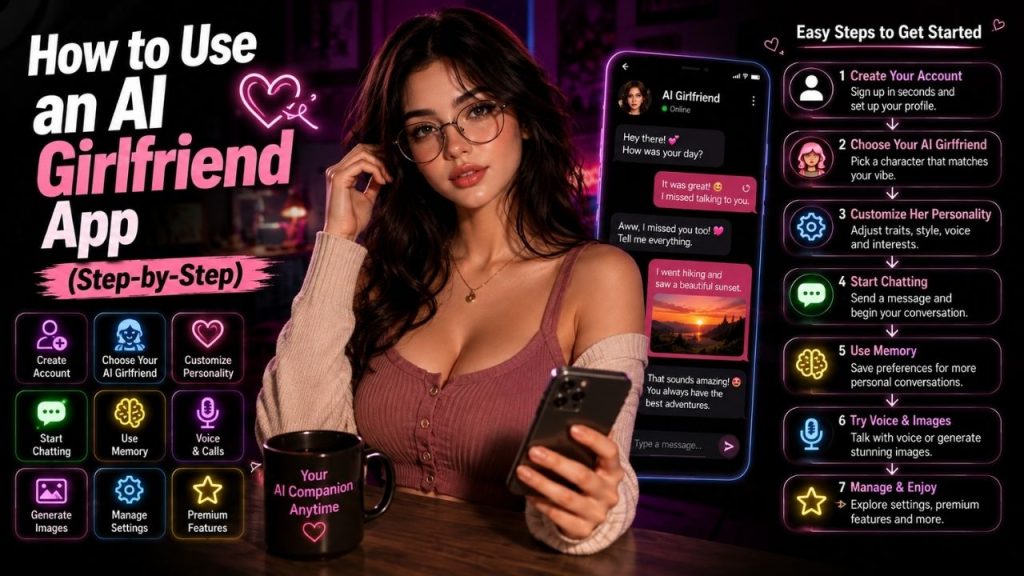
Using an AI girlfriend app is usually straightforward. You create an account, choose a companion, adjust her personality, and start chatting.
Most apps work in a similar way, although the available features can vary. Some focus mainly on text conversations, while others offer memory, voice calls, image generation, character customization, or premium features.
For a first time user, there is no need to activate everything at once. Start with a basic conversation, understand how the app works, and then try the features that actually interest you.
Table of Contents
How Does an AI Girlfriend App Work?
An AI girlfriend app uses conversational AI to respond to your messages. The system considers what you say, the current conversation, and sometimes saved preferences or personality instructions before generating a reply.
Depending on the service, the experience can also include:
- Personality customization
- Long term memory
- Voice conversations
- AI generated images
- Different characters
- Roleplay
- Premium AI models
The exact experience depends on the app you choose.
How to Use an AI Girlfriend App? (Easy Guide)
The basic process looks like this:
Choose an app → Create an account → Select a girlfriend → Customize her → Start chatting → Share preferences → Use memory → Try voice or images → Manage your chats
You can complete the basic setup in a few minutes. The rest depends on how much customization you want.
Step 1: Choose an AI Girlfriend App
Start by choosing an app that matches the experience you want.
If you mainly want text conversations, conversation quality should be your priority. If you want voice or images, check those features before signing up.
You can also look at:
- Personality options
- Memory features
- Voice availability
- Image generation
- Free access
- Paid features
- Privacy controls
Do not choose an app simply because it has the largest feature list. The actual conversation experience matters more.
Step 2: Create Your Account
Once you have chosen an app, create your account through its official website or app.
The signup process varies, but you may be asked for an email address, password, age confirmation, or another supported login method.
What Do You Usually Need to Sign Up?
Most services may ask for some combination of:
- Email address
- Password
- Supported social login
- Age confirmation
- Payment information if you immediately choose a paid plan
You usually do not need to provide sensitive financial or identity information just to start an ordinary conversation.
Step 3: Choose Your AI Girlfriend
After signing in, you may see a selection of characters or companions.
Some apps provide ready made personalities, while others let you build a character yourself.
You might be able to choose based on:
- Personality
- Interests
- Communication style
- Appearance
- Voice
- Character background
Take a little time here. The character you choose will influence how your conversations feel later.
Step 4: Customize Her Personality
Once you select a character, check the customization settings.
A good customization system lets you adjust the way the AI communicates rather than only changing its appearance.
What Can You Usually Customize?
| Setting | What It Changes |
| Personality | General behavior and tone |
| Interests | Topics the AI can discuss |
| Communication style | How it talks with you |
| Appearance | Avatar or visual identity |
| Voice | Voice style, where supported |
| Preferences | Selected conversation details |
Some apps offer only basic settings, while others provide much more control.
Do not worry about getting everything perfect at the beginning. You can usually adjust the character later.
Step 5: Start Your First Conversation
Now comes the easiest part: send a message.
Your first message does not need to be complicated. Talk to the AI as you normally would when starting a conversation.
What Should You Say First?
Try something simple:
- “Hi, tell me a little about yourself.”
- “What kind of movies do you like?”
- “I enjoy playing badminton. What do you like?”
- “Let’s have a casual conversation.”
- “What should we talk about today?”
An open ended question usually gives the AI more room to respond than a question that can be answered with only yes or no.
Step 6: Tell the AI About Your Preferences
Once the conversation starts, you can share general information that helps make future chats more relevant.
For example, you might mention your favorite music, hobbies, movies, games, or preferred conversation style.
You can say things like:
“I like science fiction movies and casual conversations.”
Or:
“I prefer short and relaxed replies.”
These details can help personalize the interaction when the platform supports memory or personalization.
Keep sensitive information out of the conversation. An AI girlfriend does not need passwords, banking details, OTPs, or confidential documents to understand your preferences.
Step 7: Use the AI Memory Feature
Memory can make a noticeable difference when you use the same AI girlfriend regularly.
If the app supports memory, it may save selected details so that future conversations can feel more consistent.
How to Check AI Memory
Open the settings or personalization section and look for the memory controls.
- Check what information has been saved.
- Delete individual memories when the option is available.
- Clear unwanted memories.
- Turn memory off if the platform supports that option.
Keep in mind that memory and chat history are not always the same thing. Deleting a conversation does not necessarily delete a separately saved memory.
Step 8: Try Voice Conversations
If the app supports voice interaction, you can usually start it from the chat screen by selecting the voice or microphone option.
Before using it, check whether the app needs microphone permission.
Before Using Voice
Check:
- Available voices
- Microphone permission
- Free or paid limits
- Voice quality
- Audio settings
Voice conversations can feel more natural than text, but the experience depends on speech recognition, voice generation, internet quality, and the particular service.
Step 9: Generate Images, If Available
Some AI girlfriend apps allow you to create images of your chosen character.
The exact process varies, but it generally involves selecting the character and describing what you want to see.
What Can You Create?
Depending on the service, you may be able to request:
- Character portraits
- Different outfits
- Different locations
- Casual scenes
- Creative scenarios
Image quality, generation limits, and available styles vary between platforms. Some services also use credits for image generation.
Step 10: Keep the Conversation Natural
You do not need to write complicated prompts for a normal conversation.
Talk about specific things, ask follow up questions, and tell the AI when something is not what you meant.
Simple Ways to Get Better Conversations
- Ask open ended questions.
- Give enough context.
- Mention specific interests.
- Correct misunderstandings.
- Change topics naturally.
- Adjust personality settings when needed.
For example, instead of saying “Talk to me”, you could say “I had a busy day today. Let’s talk about movies for a while.”
The second message gives the AI more context and makes it easier to produce a relevant response.
Step 11: Manage Your Chat History
After using the app for a while, your conversation list can become crowded.
Check the chat management options available on the platform.
You may be able to:
- Start a new conversation
- Rename a chat
- Delete a conversation
- Review previous chats
- Clear unwanted conversations
Remember that deleting a conversation and deleting saved memory can be separate actions.
Step 12: Understand Free vs Paid Features
You can often start using an AI girlfriend app without paying, but free access may have limits.
Before upgrading, check what the paid plan actually changes.
| Feature | What to Check |
| Messages | Daily or monthly limits |
| Memory | Free or premium |
| Voice | Availability and usage limits |
| Images | Included or credit based |
| Customization | Free vs premium options |
| Premium models | Included or paid |
Do not upgrade simply because the app displays a premium option. First decide whether the additional features are useful to you.
Step 13: Set Up Your Account the Way You Want
After using the app for a few days, revisit the settings.
You may discover that the default setup does not match your preferences.
Check:
- Personality settings
- Memory
- Notifications
- Voice settings
- Privacy controls
- Subscription
- Chat history
This is also a good time to remove settings or memories you no longer want.
Common Beginner Mistakes to Avoid
New users often focus on the fun features and overlook the basic details.
Avoid these mistakes:
- Paying before testing the app
- Sharing sensitive information
- Expecting perfect memory
- Assuming every AI response is correct
- Ignoring subscription renewal terms
- Expecting human like behavior all the time
- Using every feature without checking what it does
You will usually get a better experience by learning one feature at a time.
How to Get the Most From an AI Girlfriend App?
The best experience usually comes from choosing a personality that fits you and giving the AI enough context to understand how you like to communicate.
Start with ordinary conversations. Once you know how the app responds, experiment with memory, customization, voice, images, or roleplay if those features interest you.
You also do not need to use every available feature. A simple text based AI girlfriend can be perfectly enjoyable if conversation is what you actually want.
Conclusion
Using an AI girlfriend app is generally a simple process:
Sign up → Choose a character → Customize her personality → Start chatting → Share general preferences → Use memory → Try voice or images → Manage chats → Review paid features
Start with the basic conversation rather than trying every feature immediately. Once you understand how the app responds, you can decide whether memory, voice, image generation, or premium customization adds anything useful.
The important part is choosing features based on how you actually want to use the app, rather than paying for everything the service offers.
FAQs
1. How do I start using an AI girlfriend app?
Create an account, choose a character, adjust the available personality settings, and start a conversation. You can then explore memory, voice, images, and other features if the app supports them.
2. Can I customize my AI girlfriend?
Usually, yes, although the available options vary. Depending on the platform, you may be able to change personality, interests, communication style, appearance, voice, and other preferences.
3. Can an AI girlfriend remember what I tell her?
Some apps offer memory features that save selected information between conversations. However, memory is not always perfect, and chat history and saved memories may be managed separately.
4. Can I talk to an AI girlfriend by voice?
Many AI girlfriend apps offer voice conversations, but availability varies. Some may limit voice usage to paid plans or charge separately for certain voice features.
5. Do I have to pay to use an AI girlfriend app?
Not always. Some apps offer free conversations or limited free access, while others require a subscription for features such as extended chats, memory, voice, images, or advanced customization.