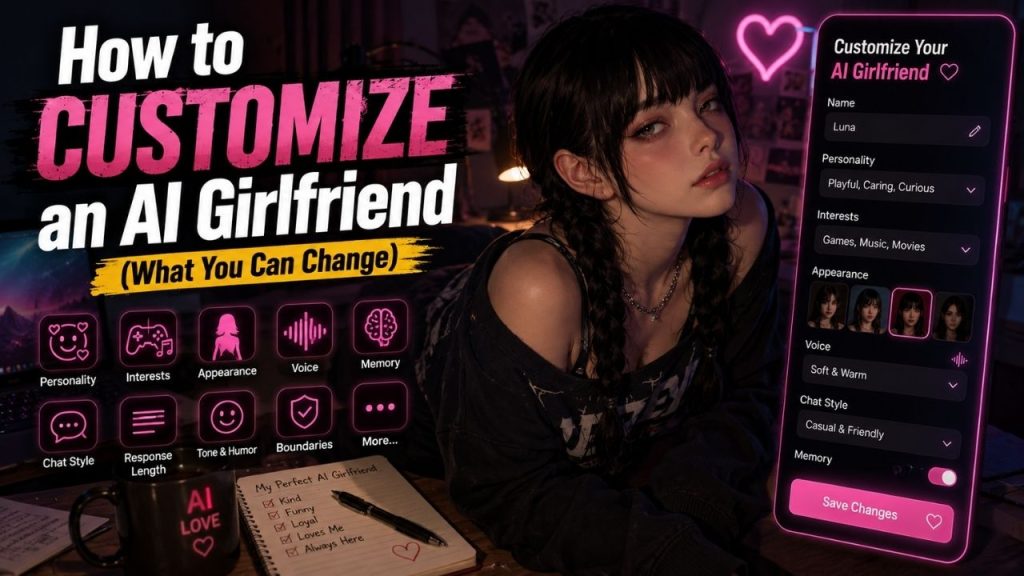
An AI girlfriend does not have to stay exactly the way you find her when you first create an account. Many apps let you change her personality, interests, communication style, appearance, voice, memory, and other settings.
The useful part is knowing which settings actually make a difference. Changing an avatar may make the character look different, but adjusting the personality and communication style can completely change how conversations feel.
You also do not need to customize everything at once. Start with the parts that matter most to you, have a few conversations, and then adjust anything that feels off.
Table of Contents
What Can You Customize in an AI Girlfriend?
The exact options depend on the app, but common customization areas include:
- Name and identity
- Personality
- Communication style
- Interests and hobbies
- Response length
- Conversation behavior
- Appearance
- Voice
- Memory and preferences
- Character instructions
Some platforms offer all of these controls, while others only provide basic personality and appearance settings.
How to Customize an AI Girlfriend (Complete Guide)
Step 1: Change Your AI Girlfriend’s Name and Identity
Start with the basics.
If the app allows it, you can change the character’s name or nickname and update parts of her fictional background.
What Identity Details Can You Change?
Depending on the platform, you may be able to adjust:
- Name
- Nickname
- General background
- Interests
- Character description
- Identity details
A simple identity is usually enough. You do not need to write a complete fictional biography.
For example, you might create a character named Maya who enjoys photography, travel, and old movies and prefers relaxed conversations.
That gives the AI enough direction without making the character unnecessarily complicated.
Step 2: Customize Her Personality
Personality has a much bigger effect on conversation than many beginners expect.
Instead of selecting every personality trait available, choose a few that naturally fit together.
Which Personality Traits Can You Add?
Common choices include:
- Friendly
- Playful
- Calm
- Confident
- Curious
- Funny
- Supportive
- Shy
- Outgoing
For example, friendly, curious, playful, and humorous can create a fairly relaxed character.
The important thing is consistency. If you tell the AI to be extremely quiet but also expect long, energetic conversations, its responses may feel inconsistent.
Step 3: Change the Communication Style
Two AI girlfriends can have almost identical personalities but feel completely different because of the way they communicate.
What Communication Settings Can You Adjust?
| Setting | Example |
| Tone | Casual, warm, playful |
| Reply length | Short or detailed |
| Humor | Light or frequent |
| Language | Simple or formal |
| Conversation style | Direct or relaxed |
| Emoji use | Minimal or frequent |
Suppose the AI is giving long, formal answers when you prefer casual chats. You can change the communication settings instead of completely rebuilding the personality.
Likewise, if replies are too short, ask for more conversational and detailed responses where the platform supports that option.
Step 4: Add or Change Interests and Hobbies
Interests give the AI something specific to talk about.
An AI girlfriend with no defined interests may produce fairly generic conversations. Adding a few real topics gives you more natural starting points.
You could add interests such as:
- Movies
- Music
- Gaming
- Books
- Travel
- Sports
- Cooking
- Technology
- Art
Be specific where it helps.
For example, “likes movies” is broad. “Enjoys science fiction movies and mystery series” gives the character a clearer direction.
You can also change these interests later as your preferences change.
Step 5: Adjust How She Responds
Sometimes the personality is fine, but the actual replies do not match what you want.
This is where response behavior becomes useful.
What Response Behavior Can You Change?
Depending on the platform, you may be able to influence:
- Short or detailed answers
- Follow up questions
- More expressive responses
- More direct replies
- Preferred topics
- Conversation pacing
For example, if the AI answers every message with a huge paragraph, shorter response preferences can make the chat easier to follow.
If it rarely asks anything back, you can instruct it to ask occasional follow up questions.
Step 6: Customize Her Appearance
If your AI girlfriend has an avatar or image generation feature, you may also be able to change her appearance.
What Appearance Features Can You Customize?
Depending on the app, these may include:
- Hair
- Hairstyle
- Clothing
- General appearance
- Avatar style
- Background
- Visual theme
Some apps offer simple preset choices, while others provide much more detailed controls.
If the platform uses AI-generated images, remember that the same character may not look identical in every generated image. Character consistency depends on the technology being used.
Step 7: Choose or Customize Her Voice
Voice can make a noticeable difference if you regularly use voice conversations.
Look at the available options and choose one that fits the character you created.
You may be able to adjust or choose:
- Voice type
- Speaking style
- Speed
- Tone
- Language
Not every platform allows custom voices. Some provide a fixed selection, while others offer more advanced voice controls as part of a paid plan.
Step 8: Manage AI Memory and Preferences
Memory is particularly useful if you plan to keep using the same AI girlfriend.
Instead of explaining the same preferences in every conversation, a memory feature may allow the app to retain selected details.
What Can the AI Remember?
Useful examples include:
- Favorite topics
- Hobbies
- Conversation preferences
- Character details
- Recurring preferences
Check the memory settings to see what has actually been saved.
Where supported, you may be able to:
- View saved memories
- Edit memories
- Delete individual memories
- Turn memory off
Remember that saved memory and chat history can be separate. Deleting a conversation does not necessarily remove a detail that was saved as a memory.
Step 9: Update Character Instructions
Some platforms provide a field where you can directly describe how you want the AI girlfriend to behave.
This can be useful when the normal settings are not enough.
What Should You Include in Character Instructions?
Keep the instructions focused on:
- Personality
- Communication style
- Interests
- Behavior
- Character background
- Response preferences
For example:
You are a friendly, curious fictional character who enjoys movies, photography, and travel. Keep conversations relaxed and natural. Ask occasional follow-up questions and avoid overly formal language.
That is enough to establish a direction.
You do not need to write an enormous list of instructions. Too many rules can make the character harder to keep consistent, especially when some instructions contradict each other.
Step 10: Test Your Customization
Do not judge your changes from one message.
Have several conversations and see whether the changes actually affect the character.
What Should You Test?
Pay attention to:
- Personality consistency
- Tone
- Response length
- Interests
- Memory
- Voice
- Appearance consistency
For example, if you changed the character to be more playful, have a few different conversations and see whether that personality appears naturally.
Make one or two changes at a time. That makes it much easier to figure out which setting improved the experience.
How to Fix an AI Girlfriend That Feels Too Generic?
Sometimes the character still feels like a standard chatbot even after customization. Usually, the problem is not that you need hundreds of additional settings.
If She Feels Too Formal
Change the communication style to something more casual and conversational.
You can also specify that you prefer natural, relaxed replies.
If She Gives Very Short Replies
Increase the preferred response length or ask for slightly more detailed answers.
Avoid requesting extremely long responses for every message because that can make normal conversation tiring.
If She Talks Too Much
Set shorter response preferences or tell the character to keep everyday replies concise.
If She Repeats Herself
Give her more specific interests and conversation topics.
You can also vary your own questions instead of repeatedly discussing the same subject.
If Her Personality Changes
Look for conflicting instructions.
For example, describing the character as both extremely shy and highly talkative may produce inconsistent behavior. Remove unnecessary traits and keep the personality description simple.
How to Make an AI Girlfriend Feel More Personalized?
You do not need to change every available setting.
The biggest improvements usually come from a few clear choices:
- Give her a distinct personality.
- Add specific interests.
- Set a communication style you actually enjoy.
- Use memory for useful preferences.
- Keep character instructions consistent.
- Test the character through normal conversations.
The conversation itself matters too. Give the AI enough context to work with, ask follow-up questions, and tell it when something does not fit the character you want.
What Should You Not Customize Too Much?
Customization can go too far.
Constantly changing the character can actually make the experience less consistent.
Avoid:
- Conflicting personality traits
- Extremely complicated instructions
- Changing several settings at once
- Constantly replacing the character’s identity
- Expecting every response to match perfectly
A few clear instructions are usually easier to maintain than a long list of rules.
Free vs Paid Customization
Basic customization may be available for free, while advanced controls can be restricted to paid plans.
Before paying, check exactly what you are getting.
| Customization | What to Check |
| Personality | Free or premium |
| Appearance | Available options |
| Memory | Free or paid |
| Voice | Included or premium |
| Images | Included or credit based |
| Character instructions | Basic or advanced |
A paid plan only makes sense when it gives you features you actually want to use.
Ready Made vs Customized AI Girlfriend
A ready made character is quicker, while a customized character gives you more control.
| Ready Made | Customized |
| Quick setup | More setup |
| Fixed personality | Adjustable personality |
| Limited control | More control |
| Easy for beginners | Better for personalization |
| Little testing needed | Requires testing and refinement |
If you just want to start chatting, a ready made character may be enough.
If you want the personality, interests, communication style, and appearance to match a specific idea, customization is worth the extra time.
Conclusion
Customizing an AI girlfriend is mainly about adjusting the settings that affect how she looks, talks, remembers, and behaves.
A practical order is:
Change identity → Adjust personality → Set communication style → Add interests → Adjust responses → Customize appearance → Choose voice → Manage memory → Update instructions → Test and refine
You do not need to change everything at once. Start with personality and communication style because those have the biggest effect on everyday conversations.
Then add interests, memory, voice, or visual customization according to what you actually want from the experience.
The best customization is usually specific but simple. A clear character with a few consistent traits will generally feel more natural than one overloaded with conflicting instructions.
FAQs
Can I change my AI girlfriend’s personality?
Yes, if the platform provides personality controls or custom character instructions. You can often adjust traits such as:
• Friendly or serious
• Playful or calm
• Shy or outgoing
• Formal or casual
• More humorous or more straightforward
The available options depend on the service.
Can I customize an AI girlfriend’s appearance?
Many platforms allow some form of appearance customization. Depending on the service, you may be able to change the avatar, hairstyle, clothing, visual style, or other appearance settings.
Can I change an AI girlfriend’s voice?
Some AI girlfriend apps provide several voice options, while others offer more advanced voice customization. You may be able to select the voice type, tone, speed, or language, depending on the platform.
Can an AI girlfriend remember my preferences?
Some apps have memory features that can save selected preferences between conversations. You should check the memory controls to see what is stored and whether you can edit or delete it.
Why does my AI girlfriend still feel generic after customization?
The character may need more specific personality and communication instructions. Try adding a few clear interests, adjusting the response style, and removing conflicting traits. Then test the character through several conversations instead of judging it from one reply.